Web Console
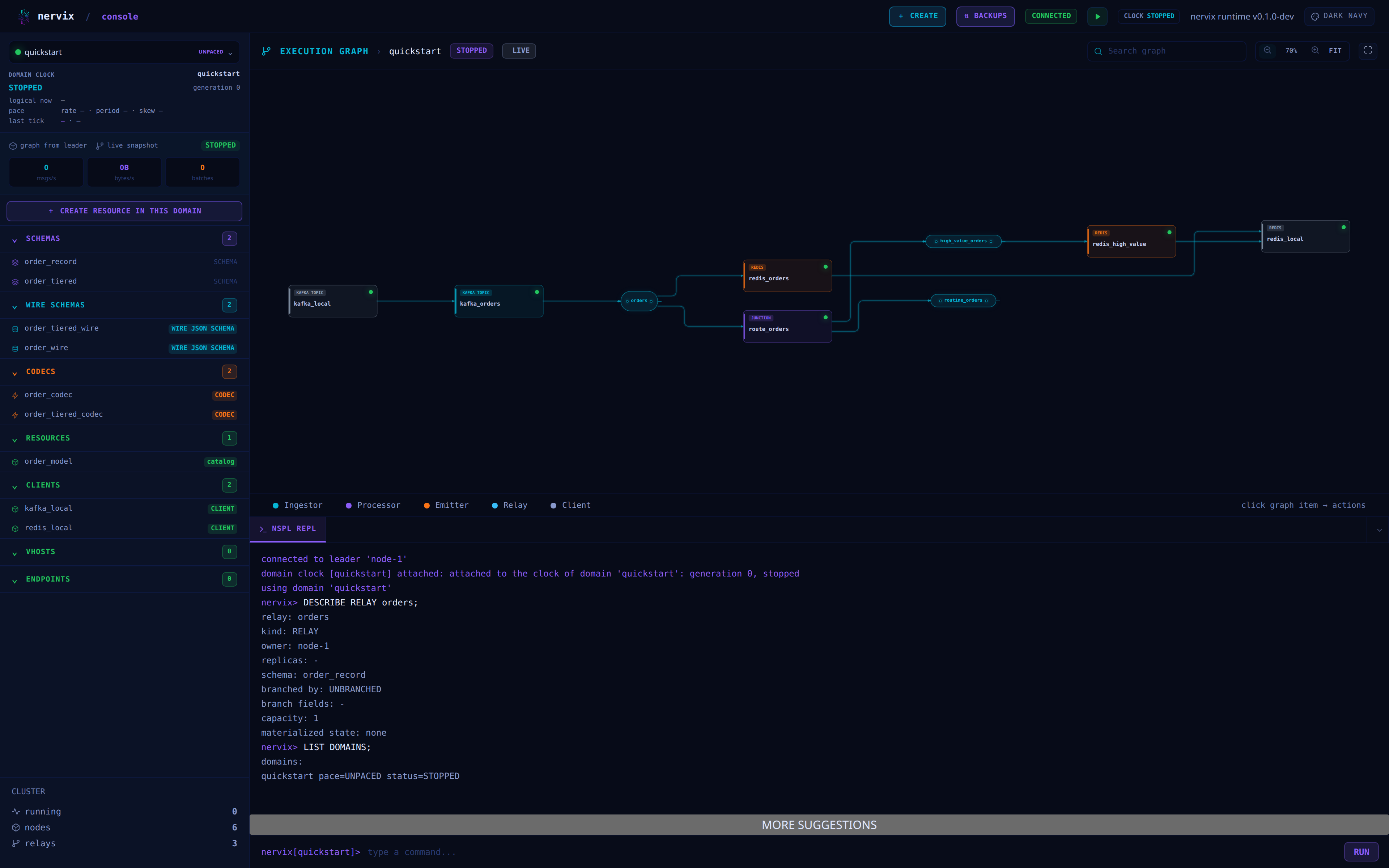
Every Nervix node serves a browser console. It combines a live drawing of the running execution graph with an NSPL command line, so the same session can be used to read a graph and to change it.
Opening The Console
The console is served by the node itself; nothing extra is deployed. It listens on 0.0.0.0:47420
by default and is served under /console/, with / and /console redirecting there:
http://127.0.0.1:47420/console/
Change the address with --web-console-listen-addr or NERVIX_WEB_CONSOLE_LISTEN_ADDR. The
published ports differ by installation method: see Docker and
Kubernetes Operator.
Any node works. Opening the console on a follower is supported — the console follows the leader redirect, reconnects there, and reports which node it reached:
connected to leader 'node-2'
Signing In
Without credentials in the URL the console shows a login form for a registry user. Two other forms are accepted, which is what automation and bookmarks use:
- an
Authorization: Basic <base64(user:password)>request header - an
?auth=<base64(user:password)>query parameter
The query parameter puts credentials into browser history and server access logs, so prefer the login form or the header for anything but a local cluster.
Layout
The console is one screen with three regions:
- the sidebar on the left: the domain selector, live throughput for the selected domain, and the domain’s entities grouped by kind — schemas, wire schemas, codecs, resources, clients, vhosts, and endpoints
- the execution graph in the upper right
- the REPL below it, which also hosts any relay subscriptions you open
The top bar carries the websocket connection state, the global Create menu, the Backups button, the domain lifecycle button, the selected clock state, and the theme picker. The clock panel below the domain selector shows the selected domain’s clock in detail.
Sidebar entries are counted per kind and each group collapses. Selecting an endpoint runs its
DESCRIBE in the REPL; selecting a resource does the same and opens its version dialog.
The Cluster footer stays independent of the selected domain: it reports the number of running
domains, non-relay graph nodes, and relays across the current cluster graph.
Following the selected domain clock
Selecting a domain attaches the console session to its clock once. The console selects the first
listed domain on its own when none is selected or the selected one disappears, and selecting
another domain, from the domain menu or with a typed USE, detaches the previous clock first. The
console’s session is served by the leader, so after a connection interruption or a leader change it
attaches the selected clock again on the new session; the server releases the earlier attachment
when its session ends. A console that holds a transaction attaches it first on a new connection,
and while the session holds it the server refuses the clock attachment, as it refuses the
automatic detach. The panel shows the attached clock’s typed state and START generation. For a
paced clock it also shows logical now, rate, period, skew, the logical origin and UTC anchor, and
the latest accepted tick id and logical boundary. Logical now is projected from the committed
mapping at the browser’s UTC, refreshed four times a second; a browser whose clock differs from the
cluster’s can show a different projection. The tick is the serving node’s accepted observation.
Stopped, uninstalled, and unpaced states have no projected logical time. A refused attachment
shows its reason and is not retried until the selection or connection changes.
The panel and the top bar’s CLOCK state name the attachment’s phase: NO DOMAIN without a
selection, ATTACHING until the attach reply, STOPPED, UNINSTALLED, UNPACED or PACED while
it follows the clock, INTERRUPTED while the connection is lost, which shows no projection,
REFUSED with the server’s reason, DETACHED after a typed detach, and ENDED with its reason
once the server ends the attachment, which the console does not attach again until the selection
or connection changes.
Creating Entities From Forms
The top bar’s Create menu opens keyboard-accessible forms for domains, users, resource
catalogs, schemas, codecs, signaling protocols, clients, VHOSTs, endpoints, hash maps, Roto UDFs,
relays, branches, ingestors, junctions, reingestors, and subscriptions. The resource group in the
sidebar also provides a contextual create action. A form keeps its unfinished draft when it closes,
restores focus to the action that opened it, reports validation and server failures inline, and
shows the canonical NSPL statement before submission. An expression typed into a form, such as a
filter, a WHERE predicate, an assigned value or an invocation argument, reads exactly as it does
in a typed statement: its string literals are verbatim, so a
backslash is an ordinary character.
The domain form supports paced and unpaced clocks, period and skew for a paced clock, placement
policy, and IF NOT EXISTS. User and resource forms support their corresponding names and the
same creation modifier.
Pace and placement are typed choices supplied by the session server. They are searchable and paged independently, and the placement lookup carries the selected pace as a typed dependency. Loading and no matches have separate neutral messages. A missing prerequisite, such as a captured domain or a selected relay for its field list, shows a neutral hint naming what to choose. A stale choice page shows a neutral message and Retry, which requests a fresh first page. Lookup, session-channel, and unreadable-reply failures remain alerts. These states apply to the domain, branch, relay, and subscription forms. An edit, dialog close, or replacement session makes an older reply ineligible to change the form.
A resource draft captures the selected domain the first time it opens. If the console later selects another domain, reopening the retained draft keeps its captured scope and offers Use current domain as an explicit change. Domain and user creation are cluster scoped. Passwords are sent in the canonical command but appear as eight asterisks in both the preview and REPL; the cleartext value is never added to terminal history.
Submitting uses the same durable command path as the REPL. The form therefore keeps the command’s execution reference through redirects and reconnects, uses the attached transaction’s expected position, and reports Editing, Submitting, Queued until reconnect, Queued in transaction, Completed, or Failed from the correlated outcome. A queued transaction operation is not presented as externally complete. A successful standalone resource create opens the existing resource version dialog, where upload identity and completion continue to be owned by the upload workflow.
The Create menu also opens forms for internal schemas, JSON/CBOR/AVRO wire schemas, and named
branches. Schema fields are added in declaration order and can be moved or removed. An internal
field selects its exact scalar type, then may wrap it in any sequence of variable vectors and
fixed arrays; each fixed array needs a positive length. Optional and sensitive flags are separate
controls. Wire fields select the types of their chosen format and an explicit STRICT or LOOSE
mode. A wire schema’s format is part of its identity, so JSON, CBOR, and AVRO definitions may
share a name. The preview and submitted command come from the completed semantic Model’s
canonical renderer, just as they do for the earlier forms.
A branch form selects an internal key schema from a server-backed, searchable, paged list, then
requires a TTL. It may set a positive maximum instance count with LRU eviction. The schema list
uses the draft’s captured domain and the session’s attached transaction prefix, so a schema staged
earlier in the same transaction is selectable. Changing the captured domain keeps a previous
selection visible but marks it invalid until it is selected again. An invalid branch key schema,
including one containing BYTES, is rejected by registry validation and shown inline with the
branch and field named. These domain-owned drafts keep their captured scope when reopened; Use
current domain changes it explicitly.
A relay form selects the relay’s internal schema from the same kind of list, then states its
branching explicitly: UNBRANCHED, or BRANCHED BY with a branch chosen from a searchable,
paged list of the captured domain’s branches. A new draft has chosen neither, and it cannot be
submitted until one is chosen, so a relay is never unbranched by omission. Capacity starts from the
default relay buffer and must be a positive count. Materialized state is NONE or LAST BY TIMESTAMP. Both lists read the attached transaction prefix, so a schema or branch staged earlier in
the transaction is selectable, and a relay created while a transaction is attached is queued in it
like the other forms’ creates. Changing the captured domain keeps the selected schema and branch
visible but invalid until each is selected again. The preview is the canonical CREATE RELAY
statement, which always states its capacity.
A codec form selects one current wire format: a declared JSON, CBOR, or AVRO wire schema; the fixed SYSLOG format; a JAQ-native JSON, YAML, TOML, XML, or CBOR format; or Protobuf. The internal schema is an exact typed selection. Declared wire-schema choices are limited to the selected format, even when wire schemas of different formats share a name. JAQ-native and Protobuf codecs choose ingestion (decode), emitting (encode), or both, and may add an emitting-batch program after an emitting program. These are program editors: their contents remain jaq source in the current codec Model, including quotes and whitespace. RFC3339 field encoding rules can be added in order where the format supports them. The preview renders the complete codec Model as canonical NSPL.
The Protobuf controls select an existing resource and one of its completed versions, including
LATEST, then accept an optional .proto file and include root, additional compiler
configuration entries, message type, and optional batch message type. The resource list includes
catalogs staged earlier in the attached transaction; the version list offers completed uploads
only. LATEST stays unresolved in the draft and submitted command, and is pinned when the server
applies the statement. These controls never create a resource or upload a file as a side effect;
provision and upload it explicitly through the resource workflow. Changing the resource or captured
domain leaves an earlier version visible but requires selecting it again. A rejected program or
configuration reports failure inline and keeps the draft editable.
A signaling protocol form chooses JSON, YAML, TOML, XML, CBOR, RAW, or Protobuf. Protobuf uses the same resource, version, file, include, and compiler configuration controls and requires separate send and wait message types. The ordered handshake editor adds SEND and WAIT steps, moves or removes steps, and keeps each step’s jaq programs in written order. WAIT steps can have multiple matchers, failure matchers, an optional capture when there is exactly one matcher, and ACCEPT DATA. The form also offers connection-wide ACCEPT DATA, failure matchers, and the handshake timeout. Its canonical preview and command preserve the order and raw program text. Both forms use the existing durable command dispatcher and retain rejected drafts, transaction positions, and reconnect handling.
A client form offers every current transport as a typed selection. Connector CONFIG remains an
ordered key/value editor whose keys and values are passed to the connector unchanged; the form
does not provision external services, topics, buckets, tables, or other objects. Redis, Postgres,
MySQL, and MongoDB clients require explicit minimum and maximum pool sizes. A client may mount an
existing resource and a completed version. A WebSocket client may select a configured signaling
protocol. Switching transports clears transport-specific configuration and signaling choices;
changing the resource or captured domain invalidates its version selection. LATEST remains a
request until the server applies the statement, when the stored binding becomes an exact version.
Configuration rows can be marked secret, and common credential keys and URLs with passwords are
treated as secret automatically. Secret inputs use password controls. The preview and the command
line history mask those values, while the transmitted command keeps the actual values.
A VHOST form accepts ordered hostnames and may bind TLS to an existing resource and completed version. A TLS VHOST installs its certificate in the HTTPS listener of every live node at command completion, including nodes that do not lead or run the domain’s graph. The certificate bundle must already be uploaded; missing or invalid material follows the existing command failure path and leaves the draft editable. An endpoint form selects an existing VHOST, requires a path, and chooses HTTP or WEBSOCKETS. A WebSocket endpoint may also select a signaling protocol. VHOST and signaling lists are typed, searchable, paged, and scoped to the captured domain, including the attached transaction prefix. An upstream selection or domain change refreshes dependent choices; stale selections must be chosen again before submission. A completed VHOST or endpoint is usable immediately by later commands through the same session.
A hash map form selects a resource, a completed version or LATEST, a codec, and a key field from
that codec’s output schema. It also requires the file path within the resource. Codec and key
choices read the captured domain and the attached transaction prefix; changing the codec makes an
earlier key selection invalid until selected again. A changed resource invalidates its version,
and changing the captured domain invalidates all references while leaving them visible for
correction. LATEST remains unresolved in the draft and canonical command; the server pins it
when the statement applies. The form shows Completed only after the resource file has decoded
and the lookup index is ready. A malformed file or unavailable version reports failure inline and
keeps the entered path and selections for inspection. A successful hash map can be queried with
LOOKUP or used by LOOKUP_HASH_MAP immediately.
A Roto UDF form keeps arguments in declaration order, with exact scalar, vector, and fixed-array
types and separate optional flags. The result has the same type controls. The current language is
ROTO_0_13, with an explicit volatility control. The source editor preserves its complete text,
including quotes, whitespace, the named function body, and Roto test blocks; canonical NSPL
chooses a safe dollar-quote delimiter around it. The server checks the declared signature exactly
and runs the Roto tests before Completed appears. Compilation, type, or test failure keeps the
signature and source editable. A completed function is available to udf:: calls in later
commands under the same session and domain.
An ingestor form offers every connector and entity an ingestor reads through a transport:
HTTP REQUEST, HTTP ENDPOINT, KAFKA TOPIC, PULSAR TOPIC, MQTT TOPIC, NATS SUBJECT,
RABBITMQ QUEUE, REDIS PUBSUB, PROMETHEUS QUERY, ZEROMQ PULL, SQS QUEUE,
WEBSOCKETS CONNECTION, WEBSOCKETS ENDPOINT, and SYSLOG LISTENER. Its client or endpoint is a
typed choice limited to that pair: clients of its connector, or endpoints of the TYPE its head
names. The preview writes the statement under that pair’s head. The source’s own fields,
delivery mode, quiesce mode, and required durations or sizes appear as explicit controls. A topic,
queue, subject, channel, consumer group, queue group or subscription keeps its text exactly as
typed, case and spaces included, and the form refuses a name its entity’s rule refuses. The
decoding codec list contains only codecs that support decoding. Timestamp behavior must be chosen
explicitly: source timestamp, NOW, or AT a typed field from the codec’s output schema.
Each ingestor route explicitly chooses an unbranched or named branch and a relay with that exact
branch declaration. Routes can be added, removed, and moved in order. They edit inheritance,
ordered output assignments and function invocations, an optional WHERE expression, branch key
assignments, an explicit flush policy, and a route-local message error policy. An ingestor error
route selects an unbranched relay and its own field assignments. The node-wide general error
policy is also required. The draft retains incomplete values and shows the canonical NSPL preview
only when every required choice and expression is valid. It submits through the usual durable
command path, including attached transactions and reconnect recovery.
A junction form chooses its exact unbranched or named branch before its input relays. A reingestor
chooses inputs first and gives each output route an independent branch action: preserve the input
branch, become unbranched, or construct a named branch from ordered key assignments. Additional
inputs are offered only when their declared schema and branch match the first input exactly.
Both forms keep input predicates, optional collection bounds, materialized dependencies, and
output routes in visible order. A materialized dependency resolves against the incoming branch and
requires REQUIRED SKIP, REQUIRED WAIT, or DEFAULT with ordered assignments. Each transforming
route has ordered inheritance, output assignments, and invocations, an optional predicate, an
explicit flush policy, and a route-local message error policy. Server-backed choices restrict
output and error relays to the required branch and offer only materialized relays for state. A
changed domain or dependent reference keeps the draft visible and requires the affected choice to
be selected again. The preview and durable submission use the completed semantic Model; registry
validation reports any remaining schema, branch, sensitivity, or graph error inline.
The Execution Graph
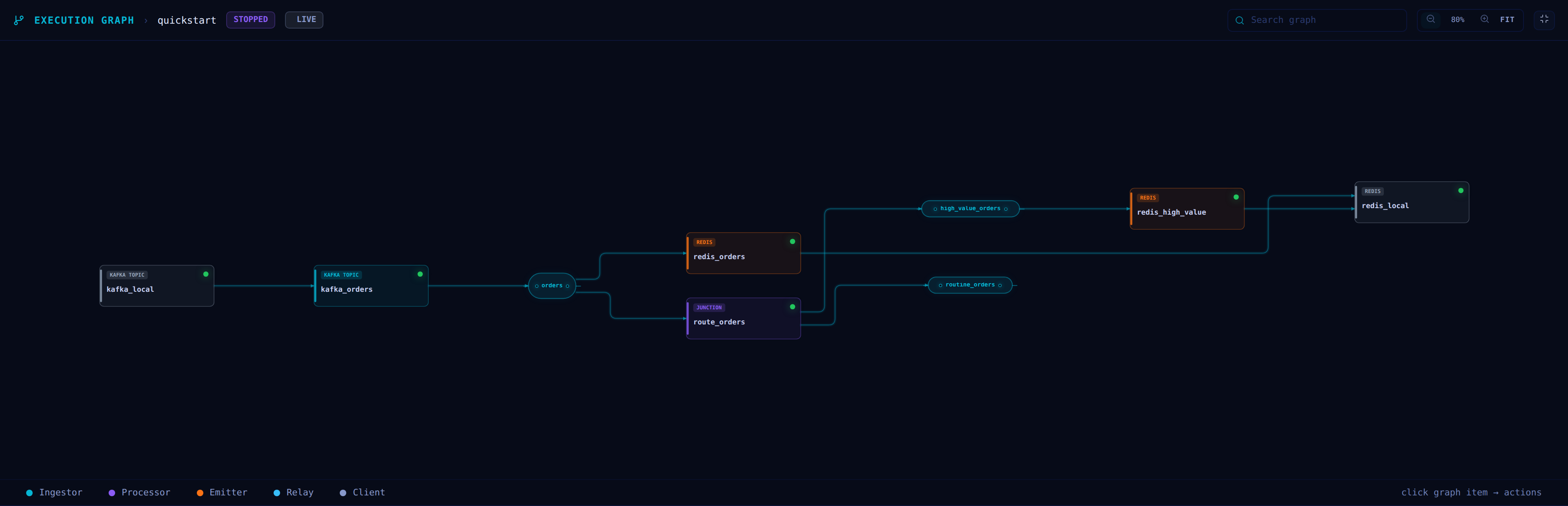
The graph is redrawn from snapshots the leader pushes twice a second. It shows external clients, ingestors, processors, relays, and emitters, connected in the direction records flow.
Records always travel from left to right. Items sit in columns ordered by how far a record has travelled, and every item appears to the right of everything that feeds it. Relays get columns of their own between the processing columns, drawn as labelled capsules with a bar per buffer quantile and the p50/p90/p99 depths on hover, so a relay reads as the port its producers converge on and its consumers fan out from. A pipeline with no branching or fan-out is drawn as a single straight line.
Edges run horizontally and vertically with rounded corners, through gutters kept clear of the items, so no edge ever passes under a node, a capsule, or a label. Each edge leaves and arrives at its own attachment point, so a node with several outputs fans out visibly rather than from one spot. Two relations between the same pair of items stay two edges: a node that both reads a relay’s records and looks up its materialized state draws one edge of each style, side by side. Edge style carries meaning:
- solid — records flowing
- dashed, error tint — a route’s
ON MESSAGE ERRORdestination - dashed, warning tint — a correlator’s
ON TIMEOUTdestination; a correlator’s two inputs are labelledLEFTandRIGHT - dotted, hollow arrow — a materialized-state dependency, including the relay a generator reads
with
USING MATERIALIZED STATE. State is looked up rather than delivered, so these edges carry no rate
A graph that feeds back on itself — a reingestor writing a relay that reaches it again — draws that one edge as a marked return path above the items it spans, so backwards travel is never mistaken for forward flow. Disconnected parts of a graph are stacked as separate bands.
When traffic is flowing, each edge carries its own rate, with the full messages, bytes, and batches per second on hover, and a pulse travelling along the edge. Where a node declares several routes to the same relay they are drawn as one edge, and hovering reports how many routes it stands for.
Branch groups are drawn as a tinted region with a stacked outline around the part of the graph that
runs per branch, containing exactly the items that run per branch and nothing else. Regions of
different branches never touch, even where they share a column. The region is
headed with the branch name, its key fields, and how many branch instances are currently live; the
outline thickens with that count. The count comes from the per-branch statistics of the graph
snapshot, which name each concrete branch by the lowercase hexadecimal fingerprint of its key, so a
snapshot never carries key values a branch schema may declare SENSITIVE. The ingestors and
reingestors that construct the branch, and the emitters and reingestors that collapse it, sit on
the region’s border rather than inside it. Clicking the header opens the branch’s key schema and
its live instances.
The toolbar controls framing. Search highlights matching items, dims the rest, and brings the
matches into view; the zoom buttons step in tens and Ctrl/Cmd with the scroll wheel is
continuous, both between 25% and 300%; FIT frames the whole graph, which is also the view you
start with; the fullscreen button expands the graph over the whole window. Dragging pans. The
graph moves only when the topology changes, and never because traffic changed.
The header carries the domain’s lifecycle state — RUNNING, PAUSED, or STOPPED — and the state
of the feed: LIVE while snapshots arrive, STALE when they stop, and OFFLINE when the session
is disconnected. A stopped domain still draws its whole graph, with no rates and no pulses.
A domain with no installed graph shows NO ACTIVE DATAFLOW GRAPH instead.
Item Actions
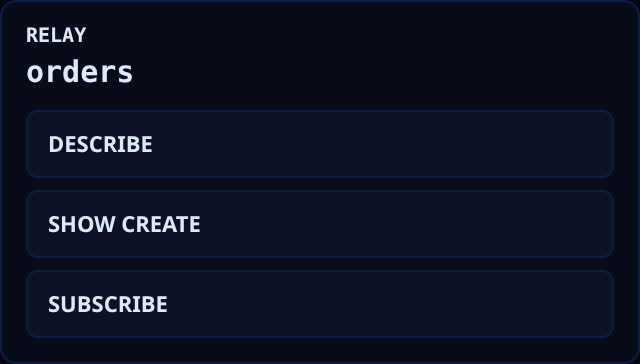
Clicking any node or relay opens its action menu. Each action types the corresponding statement into the REPL and runs it, so the console never does anything you could not have typed:
- DESCRIBE — the runtime view of the item, where the item has a
DESCRIBEform - SHOW CREATE — the NSPL that declares it
- SUBSCRIBE — relays only; opens the subscription form described below for that relay, whose
tab runs the same
CREATE SUBSCRIPTIONthe REPL accepts
Node Health
Nodes are drawn with their runtime status. A node whose external connection has failed is marked in error, and an ingestor or emitter waiting to reconnect shows a countdown to its next attempt. Hovering a node reveals the underlying reason. Metrics for alerting belong in the observability endpoint rather than here — see Metrics And Observability.
Subscribing To A Relay
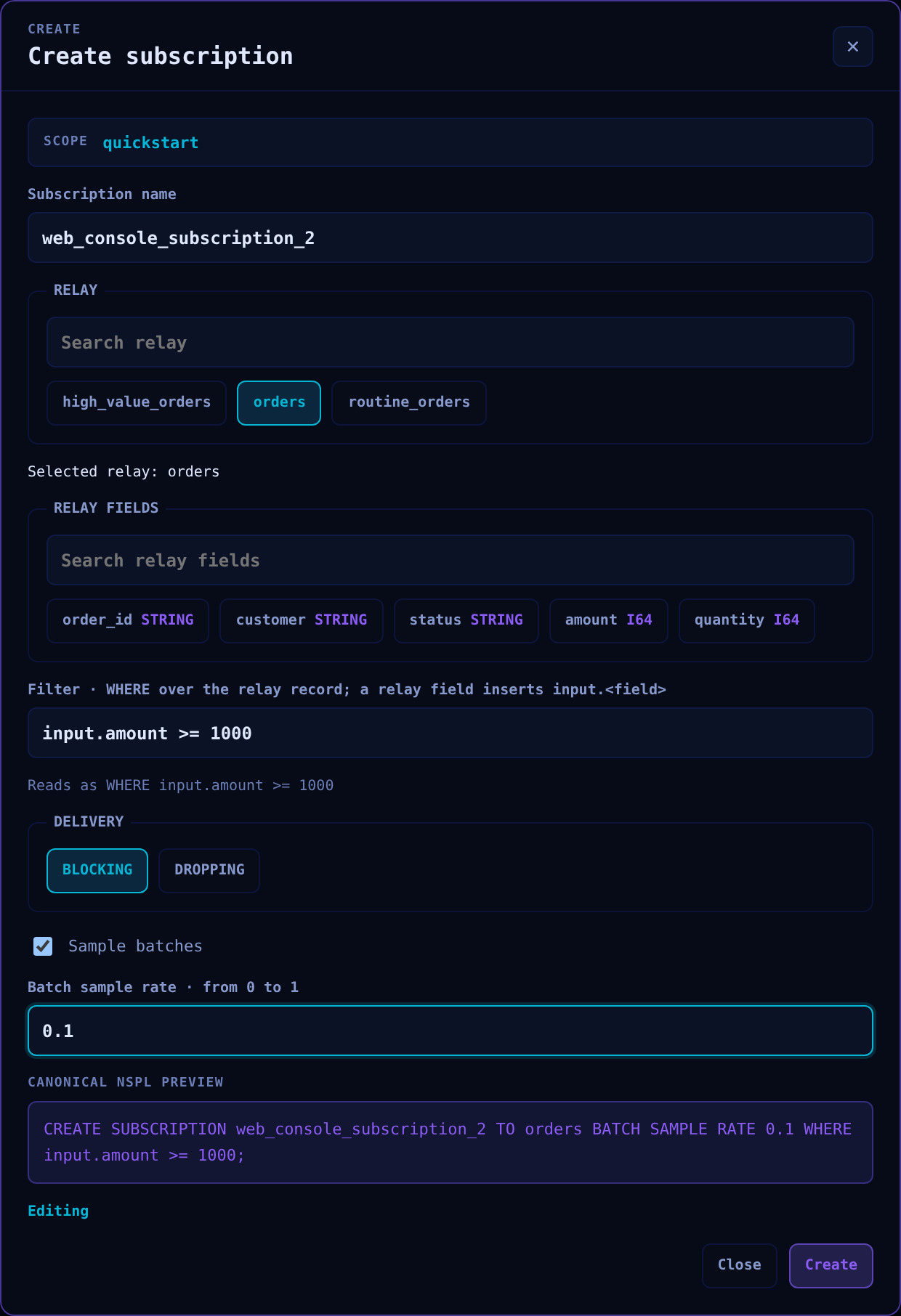
The Create menu’s subscription form opens a read-only session subscription as a tab beside the
REPL. A relay’s SUBSCRIBE action opens the same form as a new draft for that relay in the
graph’s domain, while the Create menu reopens the retained draft. A draft starts under a
generated name such as web_console_subscription_2, which can be edited; names are unique among the
console’s tabs.
The relay is selected from a searchable, paged list of the captured domain’s relays. The selected
relay’s fields are listed in declaration order with their exact types, OPTIONAL, and SENSITIVE;
selecting one inserts a typed input.<field> reference into the filter. The filter is the WHERE
predicate over the relay’s record. While it is edited, the form shows its canonical reading, and it
refuses to submit text that is not an expression. Checking the fields, scopes, and types the
predicate uses belongs to the server, which reports a failure such as a string compared with an
integer field when the subscription is created. Delivery is BLOCKING or DROPPING, and batch
sampling takes a rate from 0 through 1 that each selected row passes with that probability. The
preview is the canonical CREATE SUBSCRIPTION statement the tab sends.
Submitting opens the tab through the same subscription lifecycle as a CREATE SUBSCRIPTION typed in
the REPL. The tab waits until the session can serve it, opens and becomes active once the server
announces the schema of its rows, and streams records into it. The form reports Completed once
the tab is open. It reports Failed with the server’s reason, such as a relay that no longer
exists, a filter the server cannot compile, or an open transaction, and then no tab remains and the
draft stays editable. A name an open tab already uses fails before anything is sent. After a
reconnect or leader change, the console restores each open tab once under its name; the form does
not submit it again.
The console restores its tabs before it attaches the session’s transaction again, because a session that holds a transaction refuses subscriptions, so an open transaction does not keep a tab from coming back. A tab stays restoring until the server opens its subscription again. A restoration the server refuses leaves the tab interrupted with the reason, and the console tries it again every second while no transaction is attached; closing an interrupted tab stops that.
When a relay is redefined or removed, the server ends the subscriptions that read it. Such a tab turns ended: it keeps the rows it showed together with the reason, receives nothing more, and is not restored after a reconnect, which would not change why it ended. Its ↻ button resubscribes it under the same name with the statement that first opened it. The tab shows resubscribing until the server answers, then becomes active again with the relay’s current schema. A refusal, such as a relay that no longer exists, leaves the tab ended with the reason. An ended tab keeps its name until it is closed, so resubscribe it or close it before opening another subscription with that name.
Closing the tab ends the subscription; closing an ended tab only removes it, because the server already ended its subscription. Subscriptions are read-only views: they cannot construct, inherit, or produce side effects. See Sessions.
The NSPL REPL
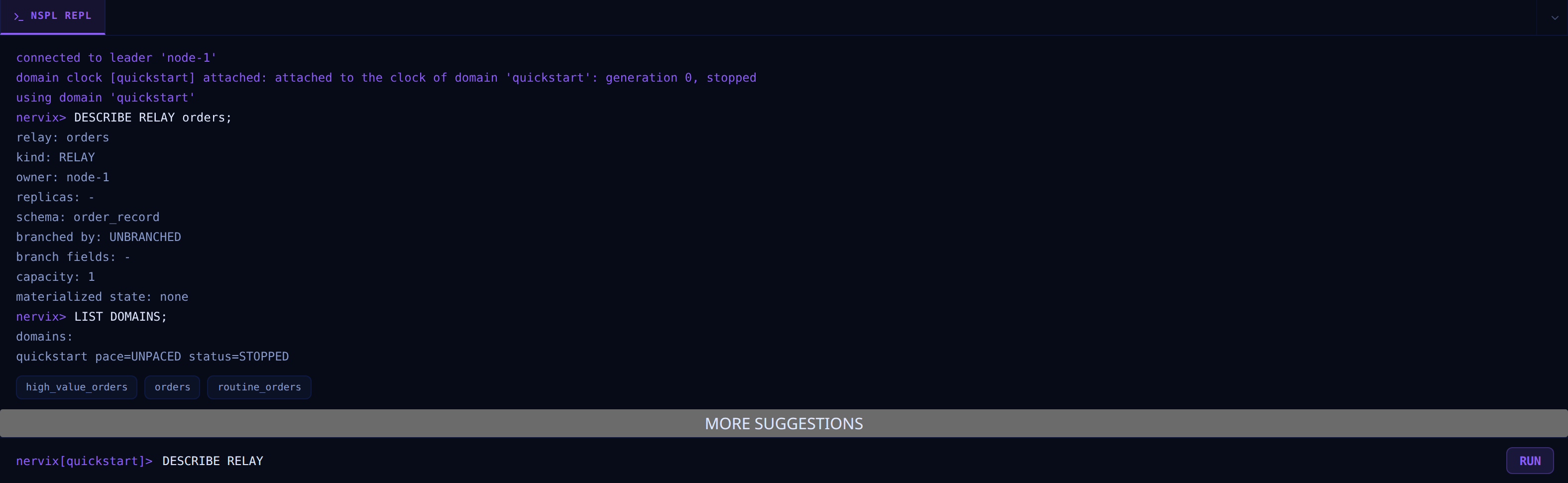
The REPL accepts the same NSPL as the command line client, including the client-local statements
USE, LIST DOMAINS, BEGIN, COMMIT, REVERT, and the subscription statements. A typed
CREATE SUBSCRIPTION opens a tab in the selected domain exactly as the subscription form does, and
DELETE SUBSCRIPTION <name> closes the open tab of that name. The prompt shows the active domain,
and marks an open transaction the same way the terminal client does:
nervix[quickstart]>
nervix[quickstart tx]>
nervix[quickstart committing]>
The console sends a statement whether or not a domain is selected, and the server decides whether
it needs one: SHOW CLUSTER STATUS or CREATE DOMAIN runs with no domain selected, while a
statement that acts on a domain fails with no active domain selected.
A typed BACKUP runs through the Backups dialog, which opens to show
its progress and downloads its archive. A typed RESTORE opens the dialog’s restore form with the
statement’s options, because the browser cannot read the path the statement names. BACKUP,
RESTORE, and DESCRIBE BACKUP must each be sent on their own, and DESCRIBE BACKUP, which reads
an archive file on the client’s machine, runs only in nervix-cli.
The REPL renders attachment outcomes, domain-clock state and tick frames, and attachment ends.
Tick entries include the id, boundary, authority UTC observation, and serving node’s logical
reading. Every tick adds a line, so a fast clock can push earlier output out of the REPL’s latest
256 lines. ATTACH DOMAIN CLOCK and DETACH DOMAIN CLOCK typed into the REPL use the same
session-local requests as the automatic attachment, and the console refuses them itself while a
transaction is active. A typed second attach is refused as already attached. A typed detach
releases the clock and leaves the panel detached until a typed ATTACH DOMAIN CLOCK, another
domain selection, or a new connection restores following.
BEGIN requires a selected domain that already exists and binds the transaction to it. The
console follows the transaction’s domain, so attaching switches the domain selector to it.
DESCRIBE TRANSACTION prints the open transaction’s impact report between queued statements, and
with an id it reads another transaction of the same user while the prompt, domain selector, and
attached transaction stay as they were. See
NSPL Overview for its forms and output.
Every persistent command keeps one execution reference while the browser waits, reconnects, or
follows leadership. The transaction id and status are replicated. If the WebSocket closes
unexpectedly or leadership changes, the console reconnects and attaches that id before resuming a
pending command. Each append is matched by its reference and expected position, and an outstanding
commit remains pending through COMMITTING until its exact terminal result. A
finished or failed attach does not settle pending commands: the console sends each under its
original reference and position to recover its own outcome, or a failure if it was never admitted.
The Create form then leaves Queued until reconnect with a completed or failed result. A
second session can attach the same owner’s transaction and take it over; the displaced console
then gets an explicit takeover error. A clean console session close reverts an open transaction,
while an accepted commit continues on the leader without the browser. See
Replicated NSPL Transactions and
Client Session Protocol.
Tab cycles through completions offered by the server for the current cursor position. ArrowUp
and ArrowDown walk the session’s command history, Ctrl/Cmd with Enter submits, and clear
empties the scrollback.
Accepting a candidate replaces its exact source range, including the rest of a word after the cursor, while preserving surrounding text. The list shows one bounded page at a time; use MORE SUGGESTIONS to fetch the next page. The console shows a message when the selected domain or transaction context is missing or stale, or when the candidate lookup fails. An empty list with no message means there are no matches.
Bounded Buffers
The console holds a bounded amount of everything it keeps, however long it runs or however fast its session delivers, and says where it left something out:
- The REPL and every subscription tab each keep their latest 256 lines, up to 256 KiB of text, and a line longer than that is cut. The first line then says that earlier lines were omitted.
- The command history behind
ArrowUpandArrowDownkeeps the latest 256 commands, up to 256 KiB. Walking back to the oldest command kept says that earlier commands were omitted, and a command larger than the whole history says that it cannot be recalled. - While the console connects or waits to reconnect, at most 64 requests of its controls wait for the session, carrying at most 4 MiB of statements, completion input, and search text. Once connected, at most 256 requests, carrying at most 16 MiB, are held or awaiting their reply. Commands, subscription changes, and inspections wait in the order they were issued while 64 requests, the most the server admits for one session, are in flight, and go out as earlier replies arrive; a completion, choice lookup, or domain selection goes out at once and is reported if the server finds the session full. A request past either bound is not sent, and the control that issued it shows why where its outcome would have appeared: the REPL, a form, a tab, the resource dialog, or the inspector. A completion request that is not sent reports a failed lookup rather than an empty list.
- The execution graph and sidebar keep only the latest snapshot of the selected domain. Selecting another domain replaces it with that domain’s snapshot, which the server sends at once.
- A backup’s download moves each 256 KiB chunk of the archive into the browser’s own blob storage as it arrives, and the page holds one chunk at a time. A restore reads its archive file one slice at a time, at most 4 MiB while it digests the file and 256 KiB while it streams it, and keeps at most 1 MiB queued on its connection.
Inspecting a transaction
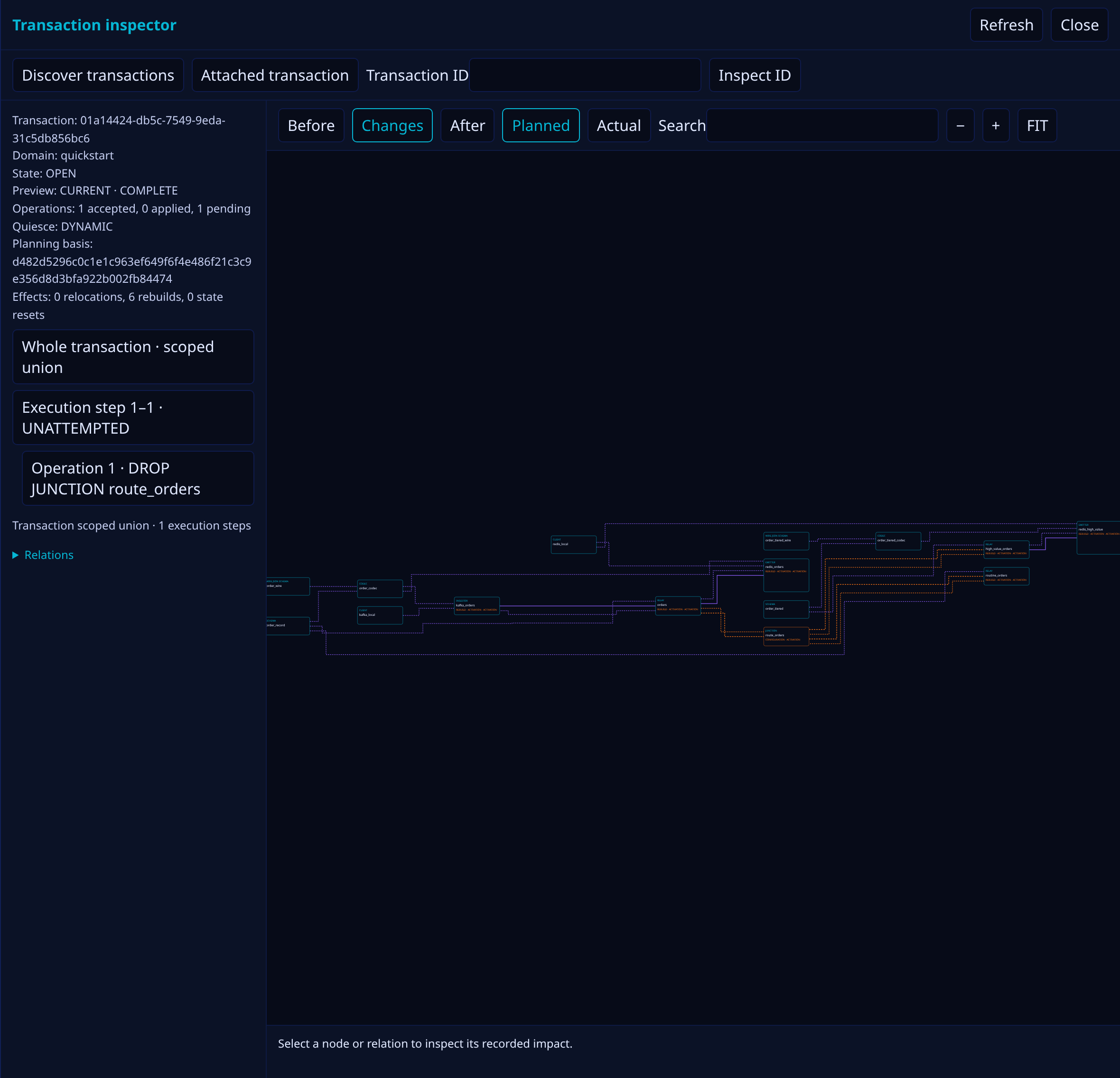
Select Transaction · Inspect in the top bar while a transaction is active. The inspector reads
the typed impact report without attaching another transaction or changing the session domain.
Use Discover transactions to list retained transactions in the REPL, then enter a transaction
ID to inspect one. A DESCRIBE TRANSACTION command also opens its typed result in the inspector;
the REPL still prints the server’s text or JSON rendering.
The outline groups accepted operations by their execution steps. Selecting an operation shows its own planned contribution; selecting its step shows the effective pause and effects of the atomic step. Whole transaction shows the union of the steps. Switch between Before, Changes, and After without moving graph items, or between Planned and Actual to review recorded progress. Search frames matching names and kinds; FIT, zoom, and drag control the viewport. Select a node or relation for its before/after presence, roles, and contributing operation numbers. The Relations list offers labeled buttons for keyboard selection of graph edges, including parallel data and materialized-state paths. Role marks and the resource card shape supplement the graph colors.
The summary names the transaction, domain, state, accepted and applied counts, completeness,
freshness, aggregate quiesce level, planning basis, relocations, rebuilds, and state resets.
An incomplete report shows its diagnostics. A stale preview must be refreshed before retrying
COMMIT. The console sends the inspected whole-transaction preview identity with COMMIT, even
when an operation is selected. Inspecting another transaction leaves the attached transaction’s
commit basis intact. Retained reports keep their own graph geometry when the live execution graph
changes.
The inspector receives the same complete typed report as the Rust client and CLI. It does not silently omit nodes, edges, operations, or steps from a large retained report; search, focus, and the outline change what is visible in the viewport without narrowing the result that was read. The Transaction Quiescence And Impact Inspection chapter defines the operation, step, and whole-transaction facts behind these views.
Uploading Resources
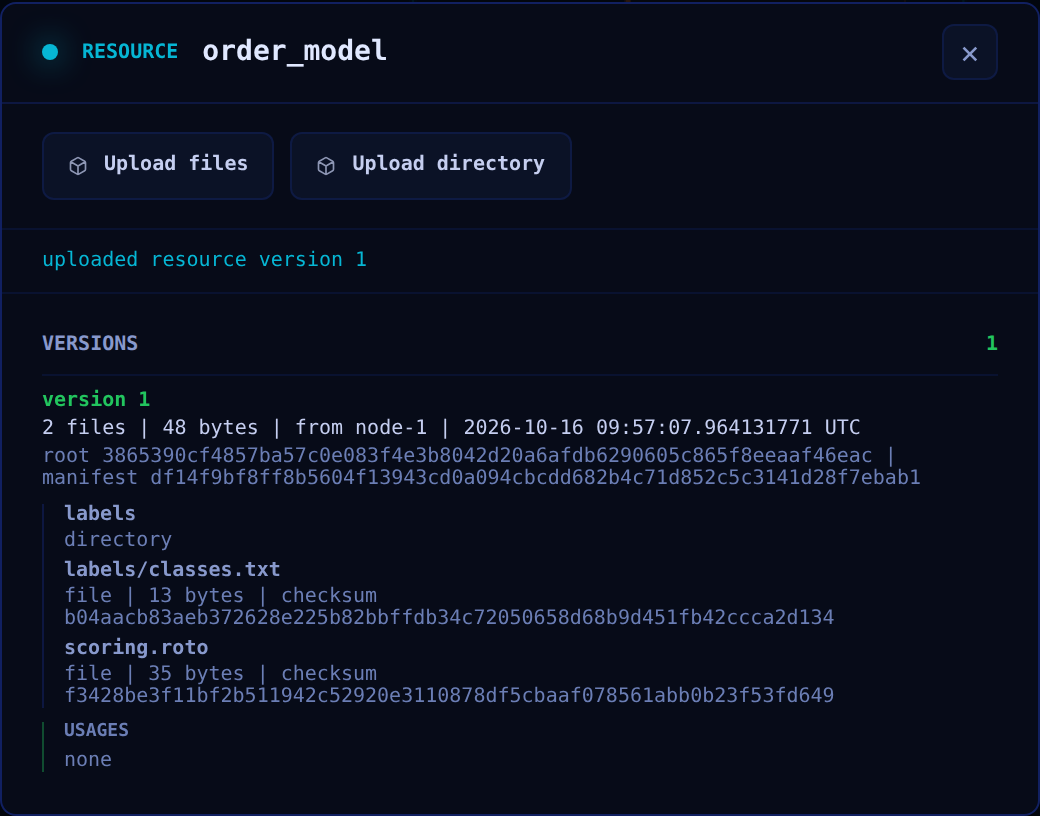
The sidebar shows each resource’s highest completed version, such as v2, or catalog while no
upload has completed. Selecting a resource opens its version list, read from the typed description
that DESCRIBE RESOURCE returns beside the text the REPL prints: every version with each file and
directory under its exact path, and under each version the models bound to it, listed by kind and
name, or none.
Files or a whole directory can be uploaded from the browser as a new version of that resource in
the selected domain. The successful upload result arrives after every current live node has
verified and installed the version. An upload moves no binding: models keep the version they pin
until REBIND RESOURCE moves them. Version contents and
how nodes consume them are covered in Resources.
Backing Up And Restoring
The top bar’s Backups button opens a dialog with two forms, Back up and Restore. They
run the same BACKUP and RESTORE statements as nervix-cli, on the console’s own session: they
follow its leader redirect, and a statement typed in the REPL runs through the same dialog. Each
form is bound to the statement’s options and shows the canonical NSPL it sends before you submit
it. Backup And Restore describes what the statements capture and restore.
Taking A Backup
The Back up form backs up the cluster or one domain, the selected domain by default, into the
archive file you name. It captures runtime state quiesced, optionally with a drain timeout, live
(WITHOUT PAUSE), or not at all (WITHOUT STATE), and can leave resource bytes out (WITHOUT RESOURCES). Back up and download sends the BACKUP as a command. Once it completes, the
dialog lists the summary the backup reported: the archive’s size and BLAKE3 digest, when it was
captured and until when it can be downloaded, the users, and each domain with its cut, revision,
and sections. The REPL prints the outcome as it prints any command’s.
The console then downloads the archive from the leader that assembled it, and checks it as it arrives. It accepts the archive only once every byte arrived and the size and BLAKE3 digest match the summary, and only then hands it to the browser as a download, saved under the last component of the file the statement names; the browser chooses the directory. A partial or altered archive never reaches the browser’s downloads. The first complete download releases the archive on the leader.
A download that fails in transport, stalls, or ends early starts again from the first byte while the leader retains the archive, and Download again retries one that stopped for such a reason. A download the leader refuses, because the archive expired, a download already collected it, or the node that assembled it restarted, ends with that reason; the backup itself completed, and running it again assembles a new archive.
The console records each backup it sends in the browser tab’s session storage until the archive is downloaded. Reloading the page while the backup runs or downloads sends the same backup again under its execution reference: the leader answers with the backup’s recorded outcome instead of running it twice, and the console downloads the archive again from its first byte. The node collects an archive once it has queued the archive’s last bytes for a download, so a reload that comes after that moment finds the archive collected, and the backup must run again. Closing the tab or signing in as another user forgets the record. So does a reload that finds a record the console cannot read back as exactly what it wrote, such as one edited outside the console; the reload then resumes nothing. An archive stays downloadable only while it is retained, by default for 15 minutes from the moment the console sent the backup.
The browser saves the archive with the permissions of its downloads directory. An archive holds password hashes, client secrets, and TLS private keys, so keep a downloaded archive where only its owner can read it.
Restoring An Archive
The Restore form restores one domain of an archive, under its archived name or a new one, or a whole cluster archive with its policy for users the cluster already has. It can resume the restored domains at their archived lifecycle, and leave out source offsets or all runtime state.
Choose the archive file, set the options, and select Dry run. The console reads the file once to
measure its size and BLAKE3 digest, then streams it to the leader with the statement’s DRY RUN
form, showing how many bytes it has read and sent. The dry run reports what the restore would
create: each domain under the name it would have, with its status, start version, models, and
resource versions, and every step it would apply. The planned model run of each domain is drawn
with the transaction inspector’s view.
Restore streams the archive again and runs the same statement without DRY RUN. It stays
disabled until a dry run of the current options and file has planned the restore. The result lists
each step as applied, failed, or not attempted: a restore that fails at a step keeps the steps
before it, and the dialog names the step. A refusal shows the leader’s reason, such as a domain
that already exists or an archive that is not a valid backup archive, and changes nothing.
A restore that skips archived state says so. The result lists the restore’s warnings above its
report, as nervix-cli prints them: the state the restored schedule cannot take, such as a window
whose model changed, with the reason. The REPL prints the same warnings after the restore’s
message.
A restore runs outside transactions, so the form refuses while the session holds one. Every attempt sends the same execution reference, statement, and archive: a lost connection or an unknown outcome streams the archive again, from its first byte, until the leader answers. If no answer arrives within about ten minutes, the dialog reports the restore’s outcome as unknown and names its execution reference.
The console never renders what an archive holds beyond the summary a backup reports and the report a restore returns.
Domain Lifecycle
The sidebar’s domain selector switches the console between domains; the top bar shows the selected
domain’s state and runs START; or STOP; for it. Both statements appear in the REPL as if you
had typed them. See Start And Stop.
Themes
Four themes are available from the top bar: Dark navy (the default), Pure dark, D0ZNPP, and Light.